6/14/2013

Google Docs


Today’s young people are using a range of digital tools to compose and create in new and exciting ways and it is a game-changing moment for teachers of writing. The very notion of what it means to write is shifting, and educators are faced with adapting their teaching practices to integrate new technologies while redefining writing and learning for the 21st century. That is where Google Docs comes into play, Google Docs is a wonderful free tool for teachers and students alike which allows for the creation of a variety of different text documents, spread sheets, and presentations as well as surveys. The ability to be able to share and comment for collaboration and immediate feedback, for its use as a research tool and the integration of spell checking and reference software makes it a fantastic tool for student productivity.

 Some of the best features of Google Docs that teachers need to know about are that :
  • It is free and very easy to use.
  • It has a user-friendly interface.
  • It lets you create Google documents, spread sheets, and other file types and collections.
  • It lets you upload, manage and store files and folders.
  • It allows you to share Google Docs, files and collections.
  • You can preview your docs and files before you open or share them.
  • You can also view images and videos that you have uploaded to your document list.
  • It lets you search for items by name, type and visibility setting.
  • It allows users to collaborate on documents in real time.
  • It also offers a chat functionality for collaborators to use while working on docs. 
Some uses for Google Forms and its applicability in collecting data within the classroom include:
  • Having students conduct experiment in classroom and one member goes to teacher's computer to enter data for that group.
  • Having students create surveys using Google forms and display on own computer; students travel from machine to machine to fill out the survey.
  • Emailing forms to participants to collect data (can embed the form in the email); must know all members email addresses.
  • The ability to embed the form in a Google Site, wiki, class blog or Moodle.
Google Docs has tremendous potential for use in the classroom and used in innovative ways is a wonderful tool for learning. For more information have a look at these fantastic posts by fellow pre-service educators Jennifer Walsh and Kelly Frintzilas who examine Google Docs in more detail and a great blog by UK educator Tom Barrett who reports on ten uses for Google Docs in the classroom.

QR Codes In The Classroom

 
I have always been curious about using QR Codes in education, so I decided to have a little search on the internet and came up with a wealth of information. To provide a quick explanation quick response (QR) codes are visually scannable data matrices that can store up to 7,089 numeric characters or 4,296 alpha-numeric characters – up to 590 times the information possible in a standard 12 line UPC barcode. This data capacity means that QR codes can store almost anything – URLs, text, math problems, etc. While examining the versatility of QR codes I discovered that there are many creative ways to use QR codes in the K-12 classroom. These include creating interactive scavenger hunts, serving as writing prompts, and guiding student learning to online resources. In a library they can be used on the inside cover of books directing you to other works by the author and similar books on the subject. Two fantastic articles about how QR codes can be incorporated into the classroom can be found here and here and are certainly worth reading - enjoy!

Air Server


I was wanting to show the content of  my iPad to the children I was teaching on prac and I was lucky enough to be told about Air Server by my brilliant husband. Air Server for those who are not familiar with this nifty tool is a AirPlay receiver for Mac/Pc which allows you to receive AirPlay feeds similar to an Apple TV, so that you can stream content or Mirror your display from your iOS devices. In education the benefit of Air Server is that it allows you to show content to your class to provide a highly engaging experience using an iPad. It also allows you to wirelessly beam content to SMARTBoard - which is one of my favourite features. Having the ability to not only be able to move around the classroom with an iPad in hand as well as display multiple iPads on one screen means that the applicability of Air Server for education endless. I have a love affair with Air Server and would highly recommend it being part of any teachers toolkit.

Augmented Reality In The Early Childhood Classroom


If you read my blog then you will know that I recently posted about a iPad App called ZooBurst(which is augmented reality tool that can be used within the classroom to create 3D pop up books). Well this got me to thinking about what other augmented reality tools were out there to use in the early childhood classroom and I was pleasantly surprised. One of the first augmented reality tools I came across was a program called "Letters Alive", letters alive is a augmented reality based reading curriculum which was designed not only to create a engaging learning environment but to assist students with learning and intellectual disabilities to learn about letters and their sounds, sight words and respond to statements and questions.  At a not so cheap price of $795 the developers state that Letters Alive helps students to make deeper connections with their learning by grabbing their attention visually with 3D graphics and then reinforces letter sounds and words through animated animals.  Not being able to trial this myself I would have to see it in action first to decide if it was worth purchasing.
 
The other augmented reality platform which I examined and is worth  exploring is called Aurasma. Aurasma works in a similar manner to Letters Alive however instead of having markers on cards, the markers can be images, objects or places. Aurasma's functionality in education is becoming well documented and their are various videos on YouTube which demonstrate this, however I thought for the purpose of examining its applicability in the primary classroom I would include the YouTube clip above to my blog post. As a pre-service teacher I can see unlimited potential with this app and I personally cannot wait to try it out myself.
 

6/13/2013

Flip The Classroom

 
I am fortunate to have a fairly IT savvy husband who not only teaches but also manages the IT system at a local high school. I was therefor very grateful to him for passing on a magazine titled Education Technology Solutions. One of the articles that caught my attention in this magazine is "Flip The Classroom And Deliver Gold Learning Nuggets To Students" by Dinesh Poorun and Dr Greg Whateley. The flipped classroom model (or blended learning model) is based on the premise that the students that we teach in todays classrooms are good at decoding information via media. It therefor should come as no surprise that one of the main ideas behind a flipped classroom is to provide short instructive videos which can be watched at home in lieu of a "lecture" (for lack of a better term) in the classroom. The benefit of doing this is it allows teachers to spend more 1:1 time with each student and students have the opportunity to ask questions and work through problems with the guidance of their teachers and the support of their peers – creating a collaborative learning environment. With the potential to personalize learning for students, the flipped classroom model certainly has its place in the future of primary and secondary education but what happens for those who don't have access to appropriate technology at home? Another educator who is also exploring this question can be found here.

Teaching and Social Media

 
"Your a teacher, you shouldn't blog"

Hmm these are the opening lines of a thought provoking article about teachers using social media particularly blogging. Well if you are reading this, then it is obvious to me that you know that I blog. Yes I put my thought out there for the world to read and react in whatever way they choose. My experience of blogging so far has been overall quite positive but I have to admit there have been days when people have decided to target my blog and have left me in tears. So why do it? Well (a) because if I don't I will fail my ICT course ;) and (b) because used in the appropriate manner blogs can be a fantastic part of a teachers toolkit. Personally, social media has led to allowed me to maintain some of the best professional relationships I have had, allowing me to link with visionaries, crowdsourcing information, and discuss the best education practices. Social media is certainly a popular topic amongst my fellow educators and I found a wonderful post about the role of social media in our lives at Kinder Bytes by Janine Allman who has reflected on the roll it has played in her life. What has your social media/blogging experience been like?

6/10/2013

ePortfolios


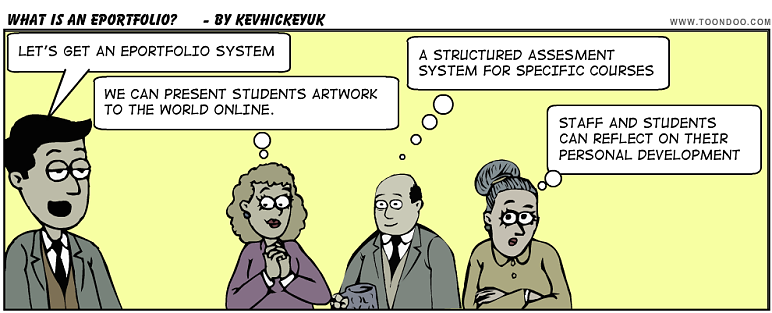
After needing to have a quick look at my ePortfolio via Mahara I was thinking of some of the ways in which teachers could use ePortfolios to enhance student learning (for those who are unfamiliar with what an ePortfolio is it can be explained as being a portfolio which is largely electronic that demonstrates a person's best talents and mediums). In education a ePortfolio could be used in a variety of ways across a variety of subjects but most commonly for organising a collection of in-progress or completed assignments, projects or certificates and accomplishments. When examining the benefits of ePortfolios in education Kinash, McLean & Wood (2013) state that "studies have identified ePortfolios as an important learning and assessment tool because they encourage students to create individualised understandings, rather than demonstrate knowledge through teacher-defined exams, essay and research projects". And this is a key point, students should be able to demonstrate how they learn in a variety of ways otherwise we disadvantage them. For more about this subject and an interesting read explaining the benefits and pitfalls of ePortfolios have a look at this link
 
References
 
Kinash, S., Wood, K., & McLean, M. (2013). The Whys and Why Nots of ePortfolios. Retrieved from http://educationtechnologysolutions.com.au/2013/04/22/the-whys-and-why-nots-of-eportfolios/